Streamline HR, attendance and payroll in one place
HrSalaryCheck brings your people, attendance, leave, payroll, live tracking and tasks together — on the web and in a mobile app, with face, Wi-Fi, QR and biometric check-ins and India-ready payroll.
- Employee
Management - Attendance
& Leave - Payroll
Management - Live Tracking
& Tasks - Compliance
& Reports - Self-Service
Mobile App
 HrSalaryCheck
matters!

Is this how your payroll runs today?
If any of this sounds familiar, HrSalaryCheck fixes it in the first month.
- Attendance kept in registers and WhatsApp messages
- Late marks, half days and overtime counted by hand every month
- Leave balances nobody fully trusts
- Salary sheets rebuilt in Excel before every payday
- PF, ESI and TDS checked at the last minute
From punch to payslip, fully automated
Every step feeds the next — nobody re-types anything.
- 1PunchFace, GPS, Wi-Fi or device check-in
- 2SyncLands in the cloud in real time
- 3ProcessShifts, late marks and leave applied
- 4CalculateSalary, PF, ESI and TDS worked out
- 5DeliverPayslips on every phone
Run the people side of the business from one place
Attendance, shifts, leave and payroll share one record of who worked when. A late punch on the floor shows up on the manager's dashboard, in the leave balance and on the payslip without anyone retyping it.
- Policies for each site, grade or contract type
- Correction requests with a clear approval trail
- Payroll runs that start from approved hours
- Reports you can filter by team, shift or location
- Check-in at the gate08:52 · face verified · inside Plant 2Entered once
- Shift & attendanceMorning shift · on time · 7 min overtimeAutomatic
- Leave balancePresent today — 12.5 days still availableAutomatic
- Payroll & payslipPaid day + overtime → October payslip ₹41,280Automatic
Assign work and see it done
Give field and office staff clear tasks with a due date, priority and client location. They update the status from the app with a note, and you see who finished what, when, how long it took and whether it was on time.
- Assign one task to many people at once
- Status and notes updated from the phone
- Completed on, hours taken and on-time / late
- Overdue work flagged automatically
Reports that answer the question — in Excel
Ready-made reports and charts for attendance, leave, payroll and headcount, plus custom attendance reports for any period, branch, department or employee. Check the numbers on screen, then download the same view as Excel or CSV.
- Day-wise attendance and punch in / out
- Detailed punches, working hours and overtime
- Monthly summary with payable days
- Filter by branch, department or employee
| Employee | Days | Worked | Overtime |
|---|---|---|---|
| Vikram Singh | 24 | 214 h | 12.5 h |
| Anita Verma | 25 | 221 h | 9.0 h |
| Ramesh Kumar | 23 | 203 h | 6.5 h |
Core modules, one record of work
Start with what you need today and switch on the rest later — every module shares the same employees, policies and calendar.
Attendance
Check-ins from phones, kiosks and biometric devices with GPS geofence, office Wi-Fi, face and QR — late marks, half days and overtime worked out for you.
- 7 check-in methods, chosen per team
- Geofence, face match and punch photo
- Corrections with approval trail
Roster
Plan morning, evening, night and rotating shifts for the whole month. Apply a pattern to a team or copy last month in one click.
- Monthly and weekly roster
- Week-off patterns and holidays
- Late marks follow the rostered shift
Leave
Leave types, balances and holidays per branch. Employees apply from the app; managers approve or reject with a remark.
- Casual, sick, paid and unpaid leave
- Live balances for every employee
- Approve / reject with remarks
Field Force
One screen for field operations: who is on duty, in transit or not reporting, with alerts and verified client visits.
- On duty · in transit · not reporting
- Alerts for late, outside-range, low battery
- Visit verification from tasks
- 09:30Checked in · HO
- 10:15Stop · Hazratganj · 45 min
- 12:40Stop · Gomti Nagar · 1 h 10 m
- NowTravelling · Chinhat
Live Tracking
See checked-in staff on the map and replay any day: check-in, every stop with time spent, travel and distance.
- Live map while checked in
- Day timeline with stops and route
- Location only during duty hours
Expenses
Claims with a photo of the receipt, checked against category limits and paid with the next salary once approved.
- Per-claim and monthly limits
- Approve / reject with remarks
- Reimbursed through payroll
Basic 9,000
HRA 3,600
Special 3,800
Overtime 117
PF 1,087
ESI 136
Professional tax 200
- Calculated
- Reviewed
- Approved
- Locked · payslips sent
Payroll
Salary from attendance and leave with PF, ESI, PT, LWF and TDS under the labour codes — reviewed, approved and locked before payslips go out.
- Code on Wages 50% rule, OT at 2×
- PF, ESI, state PT and LWF
- Payslips on web, app and email
Built for both sides
Owners get control and clarity. Employees get answers without asking HR.
For owners & HR
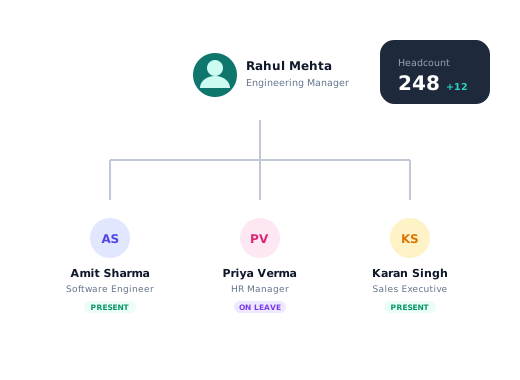
- Live attendance of every branch on one screen
- Payroll that runs from approved attendance
- Approvals for leave, corrections and claims in one place
- Reports your CA can use as they are
For employees
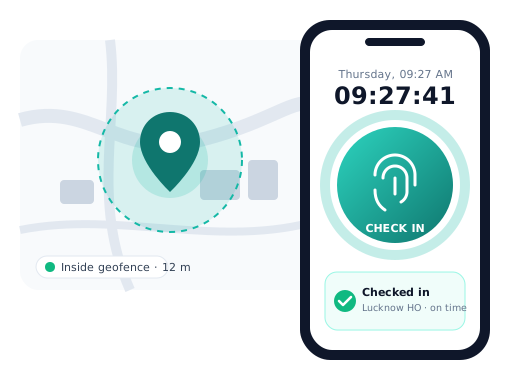
- Check in from the phone in seconds
- Leave balance and requests in two taps
- Payslips the moment payroll is done
- Corrections and claims without paperwork
The whole HR desk in every employee's pocket
Self-service for the things people ask HR about most, so your team can work on the things only they can do.
Geo-fenced punches with a selfie when needed.
See balances and apply in two taps.
Every month's slip, ready to download.
Basic25,000
HRA10,000
Special8,400
Overtime1,120
PF−1,800
Prof. tax−200
Trade with a colleague, with manager approval.
Snap the receipt and submit on the spot.
Managers clear requests from one inbox.
Everyone sees exactly what they should
Give HR, managers and employees the right access in a few clicks. Every permission is checked on the server, every change is in the audit log, and managers only ever see their own team.
- Modules switched on for your companyOnly the modules in your plan appear
- Company admin assigns rolesHR, managers, employees or your own roles
- Every action is checkedOn the web, the app and the API
- Every change is recordedWho changed what, and when
Why teams switch to HrSalaryCheck
Overtime, grace periods, rotating offs and split shifts are settings, not spreadsheets on the side.
We import your people and policies, then run a parallel payroll with you before you switch.
Attendance, roster, leave, expenses and payroll share the same employee record from joining to exit.
Talk to people who understand statutory deductions and shift rules, not a ticket queue.
Role-based access, audit trails on every change and exports whenever you need them.
- Day 1Kick-off and data import
- Day 3Policies and shifts configured
- Day 6Devices paired, app rolled out
- Day 10Parallel payroll checked
- Day 14First live pay run
What changes for your team
Month-end attendance closes itself. Late marks, half days and overtime are worked out from the roster, and corrections are approved in the app — so payroll starts from clean hours.
PF, ESI, state PT, LWF and TDS come from versioned rules, the 50% wage rule is applied for you, and nothing is paid until the run is reviewed, approved and locked.
See who is on duty, in transit or not reporting on one map, replay any day’s route and close client visits as tasks with a note from the site.
Check in, apply for leave, see the roster, claim expenses and download payslips from the phone — and get a notification when anything is approved.
Frequently Asked Questions
Everything you need to know about HrSalaryCheck - how the software works.
How does attendance connect to payroll?
Attendance captured on the Face Terminal / AI Selfie syncs directly into the payroll system. Salaries are calculated automatically based on approved attendance, shifts and leave data.
Can attendance be edited if there's a mistake?
Yes. Admins can edit attendance records with proper access controls. All changes are logged for transparency.
Does this work for night shifts and rotational shifts?
Yes. You can create multiple shifts and assign them by role or department — including night and rotating shifts.
Can employees punch attendance from anywhere?
Yes. Employees can punch in from anywhere. If you want to limit that, geo-fencing and geo tracking restrict punches to approved locations only.
Is this suitable for monthly and hourly employees together?
Yes. The system supports both fixed monthly salaries and flexible salaries like hourly, daily or weekly wages within the same organisation.
How are salary calculations done?
Salary is calculated in real time using attendance, approved leaves, loans, advances and deductions — reducing month-end errors and eliminating manual recalculations.
How are leave requests handled?
Employees raise leave requests directly from the app. Admins approve or reject from a central dashboard, and the decision reflects in payroll automatically.
Do leave balances update automatically?
Yes. Balances update the moment a leave is approved or cancelled. Monthly credit, carry forward and lapse rules run on their own — no manual adjustment.
What if leave was applied on WhatsApp or verbally?
During the switch-over, admins can record such leave on the employee's behalf. Every entry is logged with who made it and when.
Can different branches have different holidays?
Yes. Create holiday lists per branch or location. Weekly offs, holiday work and sandwich leave rules can also be set to match your policy.
Is two-level leave approval possible?
Yes. Leave can go to the reporting manager first and then to HR, and each level sees only what is waiting for it.
What can employees see on their app?
Employees can view attendance and leave balances, apply for attendance correction, upload documents, apply for leaves, check notifications and download payslips — all from their mobile.
Is there an Android app?
Yes. Employees, managers and owners use the same Android app with their own login. Each person sees only the screens their role allows.
Will employees get notifications?
Yes. Leave decisions, approvals waiting, payslips and announcements arrive as in-app and phone notifications.
Can managers approve from the phone?
Yes. Leave, attendance corrections and time claims can be approved or rejected from the app in a couple of taps.
Can field staff be tracked during work hours?
Yes, with the field force module. Live location and the day's route are recorded only while the employee is checked in, and customer visits are logged with the place they were made.
What happens if the internet fails?
The face attendance app keeps punches on the device and sends them to the cloud as soon as the connection is back, so no attendance is lost.
Can employees mark proxy attendance?
No. Every punch is matched to the registered face of that employee, and selfie punches can carry the location. Proxy punching is not possible.
Do we need to buy special hardware?
No. Any Android phone or tablet can work as a face attendance terminal. Existing biometric devices can also send punches to the system.
How does this reduce attendance disputes?
Employer and employee see the same time-stamped record in real time. Corrections go through an approval and every change is logged.
Who approves an employee's face?
HR approves each face enrolment before it can be used for attendance, so only the right person is registered.
How does screenshot monitoring work?
A small Windows desktop agent (or a browser work session) takes time-stamped screenshots at the interval you choose and records active and idle time — only during work hours and, if you want, only while the employee is checked in.
Can screenshots be blurred?
Yes. Screenshots can be blurred for everyone, or blurred for viewers who do not have permission to see them clearly. Managers see only their own team.
What is a time claim?
Some work happens away from the computer — business meetings, client visits, calls. Employees claim those hours, and once approved they count as active time.
Who approves time claims?
You choose: the reporting manager, the manager and then HR, or automatic approval. Daily limits and how many days back a claim can be made are set by you.
Is our data safe?
Each company's data is kept separate, access follows roles and permissions, every sign-in and change is audited, and connections are encrypted.
How long does it take to go live?
Most teams are live within two weeks: import employees from Excel, set shifts and leave rules, and run one parallel payroll before switching.
Is this suitable for growing businesses?
Yes. Add employees, branches and modules as you grow — the same system works for a team of 10 or 1,000.
Can we use our own domain and logo?
Yes. Your company can use its own logo, colours and domain for the employee portal and website.
Book a free 30-minute demo. We'll walk you through the system and answer anything you'd like to know.
Move your HR to HrSalaryCheck this month
Import your people, set your shift patterns and run a parallel payroll before you switch. Most teams are live within two weeks.